Professional services / n8n workflow
Keep overdue invoices from slipping through.
Invoice and Payment Reminders
- n8n
- OpenAI
- Gmail
- Twilio
- Google Sheets
- Slack
Problem
Invoices go out, then nobody chases them. Reminders are sent late or not at all, payments are matched by hand, client replies get buried in the inbox, and there is no clear view of what is overdue.
Built
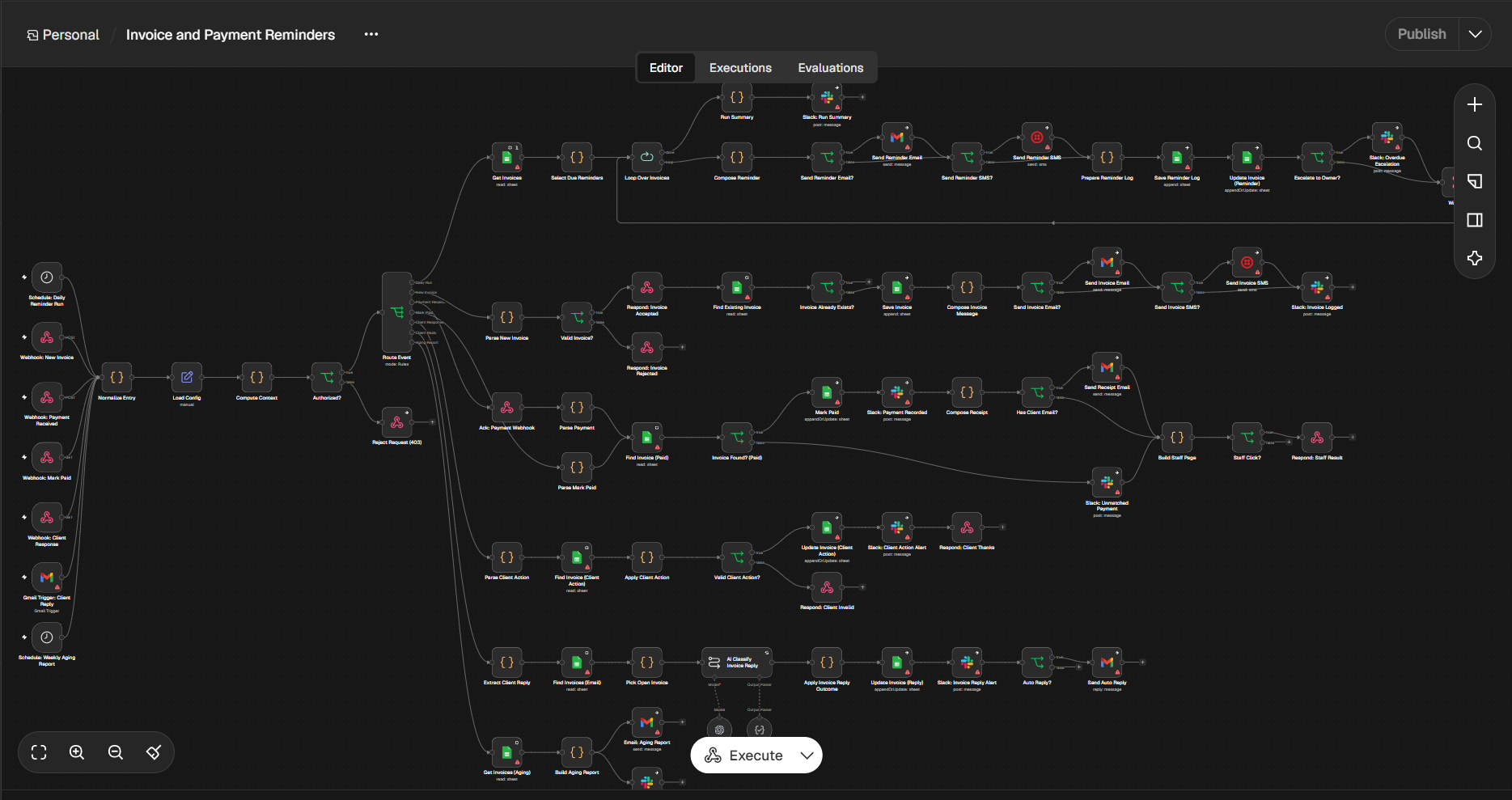
An n8n workflow that logs new invoices, sends scheduled reminders by email and SMS, marks invoices paid when payment comes in, classifies client replies with AI, escalates overdue invoices to the owner, and sends a weekly aging report. Everything is tracked in Google Sheets with Slack alerts.
Result placeholder
6 hrs saved/week on invoice follow-up
Placeholder — not a measured client result. Replace with verified time savings before presenting it as a proven outcome.
The workflow, step by step
- 1
Triggers fire the workflow. A daily reminder schedule, webhooks for new invoices, payments, mark-paid and client responses, a Gmail trigger for client replies, and a weekly aging report schedule.
- 2
Request is validated. n8n normalizes the entry, loads the config, computes context, and rejects unauthorized requests with a 403.
- 3
Event is routed. A router sends each event down the right path: daily run, new invoice, payment received, mark paid, client response, client reply, or aging report.
- 4
New invoices are logged. The invoice is parsed and validated, duplicates are checked, and valid ones are saved to Sheets. Invalid ones are rejected. The client gets the invoice by email and/or SMS, and Slack logs it.
- 5
Reminders go out daily. n8n reads open invoices, picks those due for a reminder, and loops through them. Each reminder is composed and sent by email and/or SMS, then logged and the invoice record updated.
- 6
Overdue invoices are escalated. Invoices past the threshold trigger a Slack escalation to the owner, and a run summary is posted when the loop finishes.
- 7
Payments are matched. When a payment arrives, n8n finds the invoice and marks it paid. It posts to Slack, composes a receipt and emails the client if an address is on file. Unmatched payments are flagged in Slack for review.
- 8
Client actions are handled. When a client responds through a link, the action is validated and applied. The invoice is updated, the team is alerted in Slack, and the client gets a confirmation. Invalid actions get a clear response.
- 9
Replies are classified. AI reads each email reply, picks the matching open invoice and sorts it by intent. The invoice is updated, Slack is alerted, and an auto-reply is sent when appropriate.
- 10
Weekly aging report is sent. n8n pulls the invoice data, builds the aging breakdown, and sends it by email and Slack.
Human checkpoint
Overdue invoices are escalated to the owner in Slack, unmatched payments are flagged for manual review, and replies that need a person alert the team.