Appointment-based businesses / n8n workflow
Fill your calendar and cut no-shows automatically.
Appointment Reminders System
- n8n
- OpenAI
- Google Calendar
- Gmail
- Twilio
- Google Sheets
- Slack
Problem
Appointments get missed because reminders go out late or not at all. Staff chase clients by hand, replies by text or email get lost, cancellations leave empty slots on the calendar, and no one knows if a client actually showed up.
Built
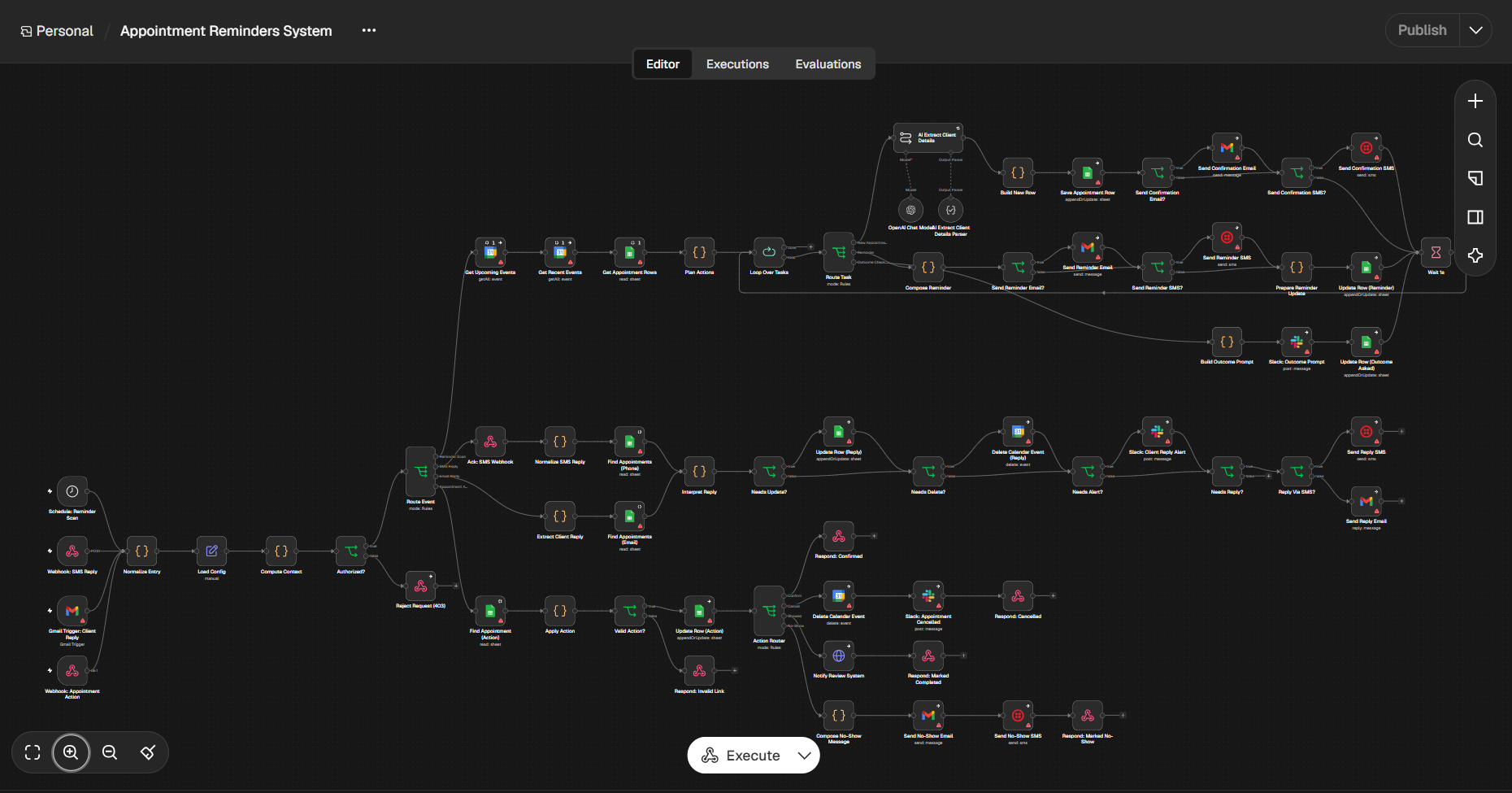
An n8n workflow that scans Google Calendar for new and upcoming appointments, uses an OpenAI agent to extract client details, sends confirmations and reminders by email and SMS, handles replies and confirm/cancel links, keeps the calendar in sync, and follows up on no-shows. Everything is tracked in Google Sheets with Slack alerts.
Result placeholder
20 no-shows reduced/month
User-supplied monthly result — not independently verified. Confirm no-show counts from your own calendar data before presenting this as a measured outcome.
The workflow, step by step
- 1
Triggers fire the workflow. A scheduled reminder scan, a webhook for SMS replies, a Gmail trigger for email replies, and a webhook for appointment action links.
- 2
Request is validated. n8n normalizes the entry, loads the config, computes context, and rejects unauthorized requests with a 403.
- 3
Event is routed. A router sends each event down the right path: reminder scan, SMS reply, email reply, or appointment action.
- 4
Appointments are gathered. On each scan, n8n reads upcoming and recent calendar events plus the appointment sheet, then plans which actions are needed and loops through them one by one.
- 5
New appointments are confirmed. The AI extracts client details from the calendar event, a new row is saved to Sheets, and a confirmation goes out by email and/or SMS.
- 6
Reminders are sent. For upcoming appointments, n8n composes a reminder, sends it by email and/or SMS, updates the sheet row, and waits briefly to avoid rate limits.
- 7
Outcomes are checked after the appointment. Slack prompts the team to record whether the client showed up, and the row is updated once asked.
- 8
Replies are interpreted. SMS and email replies are matched to the right appointment and interpreted. The row is updated, the calendar event is deleted if the client cancelled, and Slack alerts the team when needed. An SMS or email reply is sent back when appropriate.
- 9
Action links are handled. When a client or staff member clicks a link, n8n finds the appointment, validates the action, and updates the sheet. Invalid links get a clear response.
- 10
Each action is completed. Confirmations get an acknowledgement. Cancellations delete the calendar event, alert Slack, and confirm to the client. Completed appointments notify the review system. No-shows trigger a follow-up message by email and SMS.
Human checkpoint
Client replies that need attention and cancellations alert the team in Slack, and staff are prompted to confirm each appointment outcome rather than the system assuming it.