Appointment-based businesses / n8n workflow
Answer calls and book appointments automatically.
AI Voice Receptionist
- n8n
- Twilio
- OpenAI
- Google Calendar
- Google Sheets
- Gmail
Problem
Missed calls and after-hours enquiries mean lost bookings, while staff spend time answering routine questions and manually logging who called and what they wanted.
Built
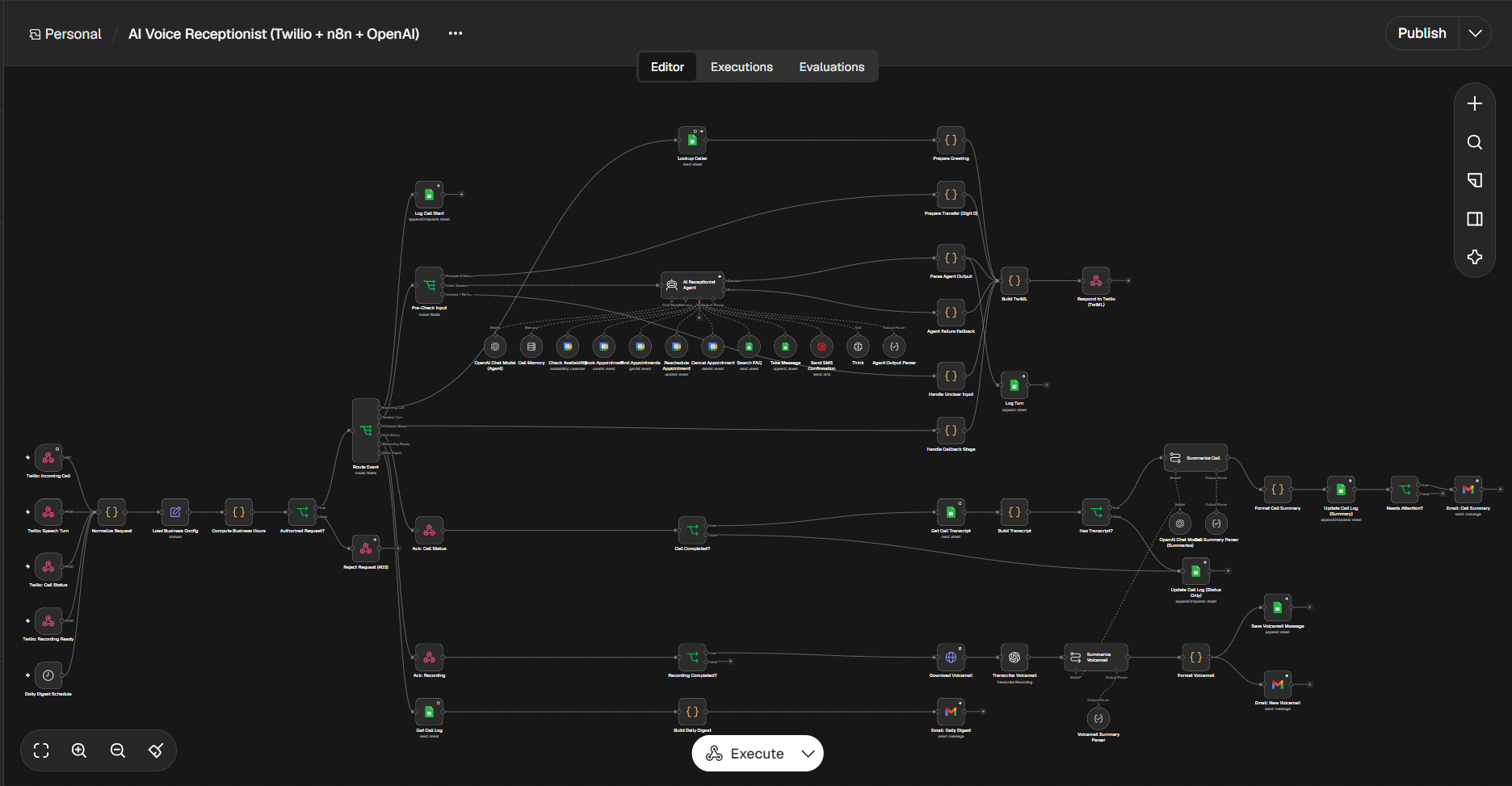
An n8n workflow that answers calls through Twilio and uses an OpenAI-powered agent to hold the conversation, book or change appointments in Google Calendar, answer FAQs, take messages, and log and summarize every call.
Result
Unlimited calls handled automatically/week
Workflow capability — not a measured weekly call count. Actual capacity depends on the connected services and usage limits.
The workflow, step by step
- 1
Twilio triggers the workflow. Webhooks fire for an incoming call, each speech turn, call status updates, a finished recording, and a daily digest schedule.
- 2
Request is validated. n8n normalizes the data, loads the business config, checks business hours, and rejects unauthorized requests with a 403.
- 3
Event is routed. A router sends each event down the right path: new call, speech turn, call status, recording ready, or daily digest.
- 4
Caller is greeted. n8n logs the call start in Google Sheets, looks up the caller, and responds to Twilio with a personalized greeting.
- 5
The AI receptionist handles the conversation. The agent keeps memory of the call and can check availability, book, find, reschedule or cancel appointments in Google Calendar, search the FAQ sheet, take messages, and send an SMS confirmation. Each turn is logged.
- 6
Unclear input and failures are handled. Unclear speech triggers a re-prompt, and an agent failure triggers a fallback response instead of dead air.
- 7
The call is summarized. When the call ends, n8n builds the transcript, the AI writes a summary, and the call log is updated.
- 8
Voicemails are processed. The recording is downloaded and transcribed, then summarized, saved to Sheets, and emailed to the team.
- 9
A daily digest is sent. A scheduled run pulls the call log and emails a summary of the day’s activity.
Human checkpoint
Callers can press 0 at any time to transfer to a person. Calls the AI flags as needing attention are emailed to the team for follow-up.